

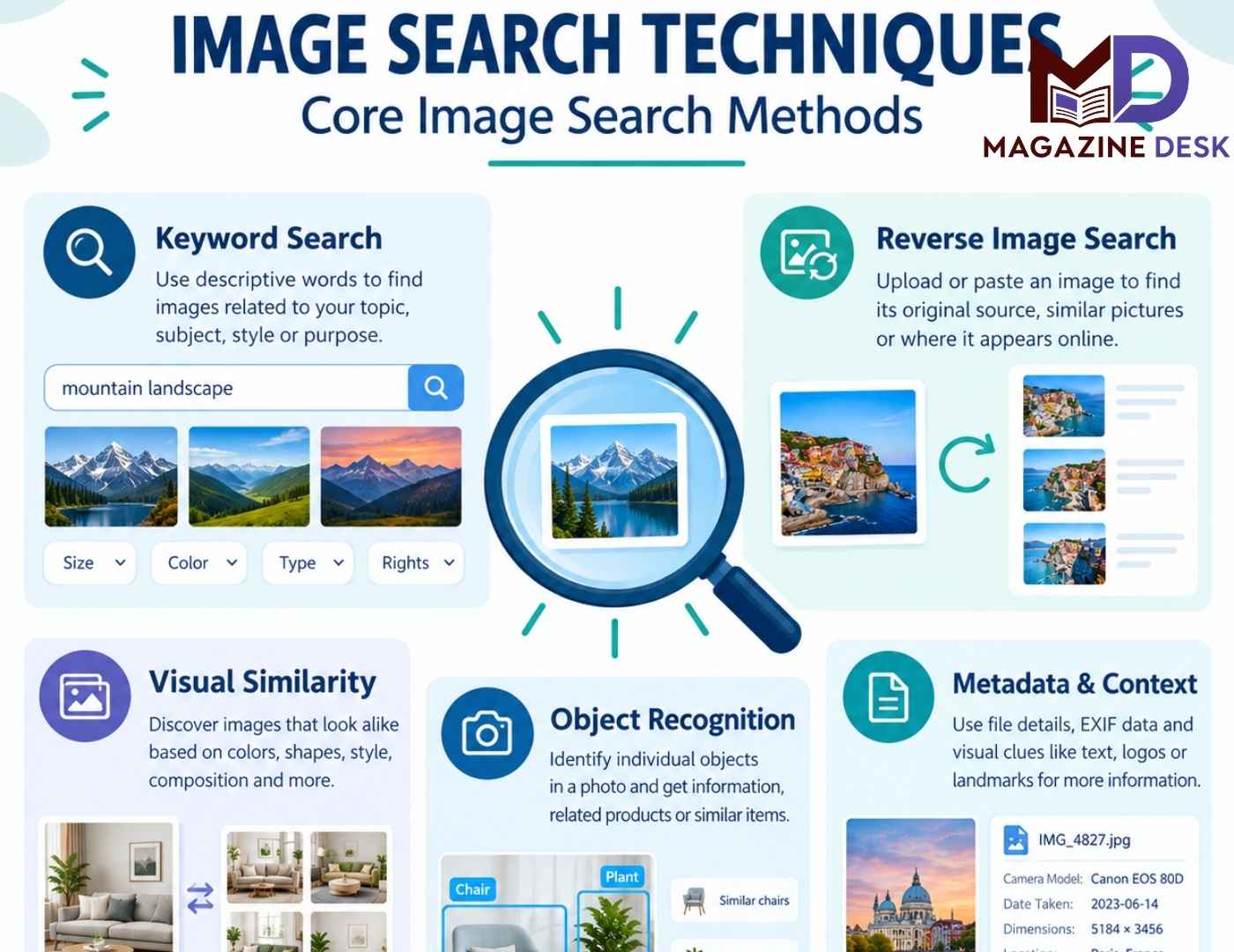
Image search techniques are methods used to discover, identify, compare, and verify images using visual information or descriptive text. Instead of relying entirely on written keywords, users can search with an existing photograph, a screenshot, a product picture, or a specific visual detail. These methods have become valuable for students, researchers, designers, marketers, journalists, online shoppers, and everyday internet users. Whether someone wants to find the original source of a photograph or identify an unfamiliar object, choosing the right search approach can save considerable time. Understanding core image search methods also helps users evaluate results carefully, distinguish genuine matches from similar pictures, and make better decisions when using visual information online.
What Are Image Search Techniques?
Image search techniques encompass the methods and technologies used to retrieve visual content from online collections. Traditional image searches depend on keywords, descriptions, captions, and tags, while modern visual search systems can analyze the contents of a picture directly. Depending on the tool, an image query may reveal exact copies, visually similar photographs, product listings, related webpages, or information about objects within a scene. These results are produced using different combinations of image recognition, computer vision, text analysis, and visual similarity matching. The best technique depends on the user’s objective. Finding a photograph’s original source requires a different approach from discovering similar design inspiration or identifying an item shown in a picture.
Core Image Search Methods Explained
The core image search methods include keyword-based image search, reverse image search, visual similarity search, object recognition, and metadata-based investigation. Each method solves a different problem, and combining several approaches often produces stronger results than relying on a single search. Keyword searches are useful when the subject is already known, whereas reverse image search works well when a user has a picture but lacks descriptive information. Visual similarity methods help discover related designs, styles, and compositions. Object recognition focuses on individual items within a larger scene, while metadata and contextual investigation can provide additional clues about an image’s history. Understanding these differences makes it easier to select an efficient search strategy.
Keyword-Based Image Search
Keyword-based image search is one of the simplest and most widely used image search techniques. Users enter descriptive words into an image search engine to find photographs, illustrations, diagrams, and other visual resources related to a topic. For example, someone searching for modern office interiors might combine terms such as minimalist office design, natural lighting, and wooden furniture. Specific descriptions generally produce more useful results than broad phrases because they narrow the subject, style, setting, or intended purpose. Users can also refine searches by selecting available filters for image size, color, format, or usage rights. The accuracy of keyword search depends partly on how well images are described and indexed.
Reverse Image Search for Finding Image Sources
Reverse image search is a central image search technique that uses an existing picture as the search query. Instead of describing an image with words, users upload a file, paste an eligible image address, or select a picture through a supported visual search feature. The service then looks for matching or related images within its index. This approach can help locate other webpages displaying the same photograph, identify modified copies, discover higher-resolution versions, or find information about an unfamiliar object. It is particularly useful when checking whether a photograph has appeared online before. However, reverse image search cannot guarantee that the earliest result is the original source, because search indexes are incomplete and publication dates may be misleading.
Visual Similarity Search and Image Matching
Visual similarity search helps users discover pictures that resemble a reference image without necessarily being exact copies. Search systems may compare colors, shapes, textures, composition, objects, and learned visual features to identify related results. This technique is useful for creative projects, fashion inspiration, interior decoration, graphic design, photography, and product discovery. For example, a designer might search using a photograph of a room to discover other interiors with similar colors and furniture arrangements. The results may share the same overall style while featuring entirely different objects or locations. Therefore, visual similarity should not be confused with proof that two images originate from the same photograph, photographer, or source.
Object Recognition and Product Image Search
Object recognition allows image search systems to identify individual items appearing within a photograph. A user might submit a picture containing a chair, handbag, plant, electronic device, or piece of clothing and search for information about the selected object. Some tools can also suggest product categories, related models, product listings, or visually comparable alternatives. This technique is particularly useful when the user does not know an item’s name or technical specifications. For better results, selecting the relevant object and excluding distracting background elements can make the query more focused. Nevertheless, automated identification is not always accurate. Similar products may have different specifications, and important details such as model numbers should be verified independently.
Metadata and Context-Based Image Search
Metadata and contextual investigation provide additional ways to understand where an image came from and how it has been used. Some image files contain information such as the camera model, creation date, dimensions, software used, and GPS coordinates, depending on the file and its settings. This information may be stored in EXIF or other metadata fields, but it can be removed, altered, or incorrectly recorded. Contextual clues can include watermarks, captions, visible signs, logos, distinctive buildings, and surrounding webpage text. Searching these details alongside an image may reveal useful information that visual matching alone misses. Reliable verification requires caution because metadata and captions are clues, not automatic proof of authenticity or ownership.
Advanced Search Operators and Image Filters
Advanced search operators help users narrow image results by specifying particular words, websites, file types, or other supported criteria. For instance, a query containing site:example.com can restrict results to a particular domain, while quotation marks can help locate an exact phrase appearing in indexed text. Image search interfaces may also provide filters for dimensions, color, orientation, file format, or usage rights. These options are valuable when searching for large photographs, transparent graphics, educational diagrams, or images associated with a particular publication. However, available operators and filters differ between search engines, and not every filter guarantees a perfect result. Users should inspect the original hosting page and licensing terms before reusing an image.
Popular Tools for Image Search Techniques
Different search tools offer different strengths, so the best choice depends on the intended task. Google Lens supports visual searches involving objects, text, products, and related images. Bing Visual Search can help users discover visually related pictures and webpages. TinEye specializes in matching images and finding modified versions within its index, with sorting options that can help investigate image history. Traditional image search services remain useful for discovering photographs by keywords and refining results with available filters. These tools do not necessarily index the same material or rank matches identically. For important research, using two or more independent services can reveal results that a single search engine misses.
How to Perform an Effective Image Search
A successful image search begins with a clear goal. Decide whether you need the original source, a similar image, an object identification, or evidence about when a picture appeared online. Start with the clearest available version of the image, then submit it to a suitable visual search tool. Review both matching images and the webpages that display them. If the initial results are weak, crop the image to isolate a distinctive object, logo, sign, or background detail. Next, search any readable text or recognizable features using ordinary keywords. Finally, compare the strongest results and inspect their publication context. This structured process reduces wasted effort and helps distinguish useful evidence from superficial visual resemblance.
Image Search for Research, Marketing, and Everyday Use
Image search techniques support a wide range of practical activities. Students can locate diagrams, historical photographs, and visual examples that support their learning. Journalists and researchers can investigate whether a photograph has appeared in earlier reporting or whether a caption is consistent with available evidence. Designers can discover visual references, explore color combinations, and study creative approaches. Businesses may use product image searches to investigate similar merchandise, review visual branding, or understand how product photographs appear online. Everyday users can identify unfamiliar objects or locate related pictures for personal projects. Each application has different requirements, particularly when accuracy, copyright, privacy, or commercial use matters. Matching the method to the task makes visual research more useful.
Image Verification, Accuracy, and Common Mistakes
Although modern image search tools can provide valuable clues, their results should never be treated as infallible evidence. A similar photograph may depict a different event, location, product, or person. An old image may be reposted with a recent caption, while a modified picture may no longer match the original search query. Another common mistake is assuming that the oldest indexed result proves the exact creation date. In reality, a search engine may discover a page long after it was published. To improve accuracy, compare captions, dates, image details, and credible source pages. For important conclusions, seek independent confirmation rather than relying on a single visual match or automated description.
Privacy, Copyright, and Responsible Image Searching
Responsible image searching involves more than finding an interesting photograph. Uploading a picture to an online service may transmit it to that provider, so users should consider privacy before submitting confidential documents, private photographs, or sensitive personal information. Copyright is equally important. An image appearing in search results is not automatically free to copy, publish, edit, or use commercially. Before reusing visual content, check the original source, the applicable license, attribution requirements, and any restrictions on commercial use. When an image includes identifiable people, private information, or sensitive locations, additional care may be necessary. Responsible image search combines useful technology with sound judgment, respect for privacy, and attention to the rights of creators.
Conclusion: Choosing the Right Image Search Techniques
Image search techniques make visual information easier to discover, investigate, and understand. From keyword-based searches and reverse image matching to object recognition, visual similarity, and metadata analysis, each method serves a particular purpose. The most effective approach begins with a clear objective, uses a suitable search tool, and refines results through focused crops and descriptive keywords. When accuracy matters, users should verify the surrounding context, compare independent results, and avoid treating similarity as proof of authenticity. Privacy and copyright considerations are also essential whenever images are uploaded, shared, or reused. By understanding these core image search methods, users can conduct more efficient visual research and make better-informed decisions about the images they find online.
Frequently Asked Questions About Image Search Techniques
What are the main image search techniques?
The main image search techniques include keyword-based image search, reverse image search, visual similarity matching, object recognition, metadata investigation, and advanced search filters. Each method helps users find or understand images in a different way. Combining techniques often produces more complete results.
What is reverse image search used for?
Reverse image search uses an existing image to find matching or related pictures and webpages. It can help locate earlier online appearances, identify modified copies, discover larger versions, and investigate potential sources. However, it cannot guarantee the original creator or first publication date.
Which image search method is best for finding similar pictures?
Visual similarity search is generally the most suitable method for discovering pictures with comparable colors, styles, objects, or compositions. It is useful for design inspiration and product discovery, although similar results are not necessarily copies of the same image.
Can image search identify an unknown product?
Yes. Visual search tools can sometimes recognize products, identify brands, and suggest related items based on a photograph. Results should be checked against product labels, model numbers, dimensions, and specifications because visually similar products may differ significantly.
Why does reverse image search sometimes produce no results?
A search may fail because the image is new, poorly indexed, privately hosted, heavily cropped, low-resolution, or significantly edited. Trying a clearer version, searching a distinctive crop, using descriptive text, or checking another search service may reveal additional results. No results does not prove an image is original.
Can image search prove whether a photograph is genuine?
No. Image search can help investigate previous appearances and identify inconsistencies, but it cannot independently establish that a photograph is authentic. Verification may require checking original sources, publication dates, contextual evidence, and other reliable information.
Are images found through search engines free to use?
Not necessarily. Search results can include copyrighted images, licensed stock photographs, and content with different reuse conditions. Before publishing or commercially using an image, check its original source and applicable license, and follow any required attribution or permission rules.
Don’t miss out—explore more stories and inspiring celebrity profiles only on Magazine Desk
